What is rsync and why is it better than scp for repeated backups?
rsync synchronizes two locations by transferring only the parts of files that actually changed, so after the first full copy, later syncs move tiny amounts of data.
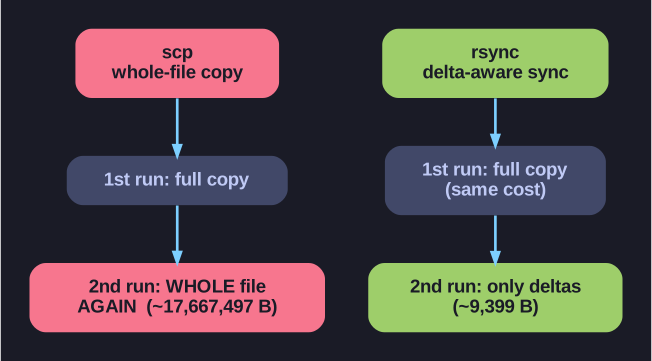
* scp copies whole files every time; rsync's later runs ship only the changed parts. *
scp re-sends whole files; rsync is delta-aware. It compares source and destination and ships only the differences, which makes it dramatically cheaper for anything you back up repeatedly:
scp |
rsync |
|
|---|---|---|
| What it sends | The whole file, always | Only the changed portions |
| First run | Full copy | Full copy (same cost) |
| Later runs | Full copy again | Just the deltas — fast |
The classic before/after:
rsync -av /var/log labstudent@server:/backup/    # 1st run: ~17,667,497 bytes
rsync -av /var/log labstudent@server:/backup/    # 2nd run:      ~9,399 bytes
The second sync moves a thousandth of the data because almost nothing changed — that's the whole point.
Why it's the backup/mirror tool of choice:
- Only deltas cross the network → low bandwidth, fast incremental runs.
- Resumes interrupted transfers instead of restarting.
- Preserves permissions, timestamps, and symlinks (with
-a). - Works locally or over SSH with the same syntax.
So: scp/sftp for ad-hoc copies, rsync whenever you'll repeat the transfer.
Go deeper:
 rsync man page — the delta-transfer algorithm that ships only changed portions.