What is SSH key-based authentication and why use it?
Key-based auth replaces your password with a matched pair of cryptographic keys: a private key you keep secret and a public key you put on the server. It's both more secure and more convenient.
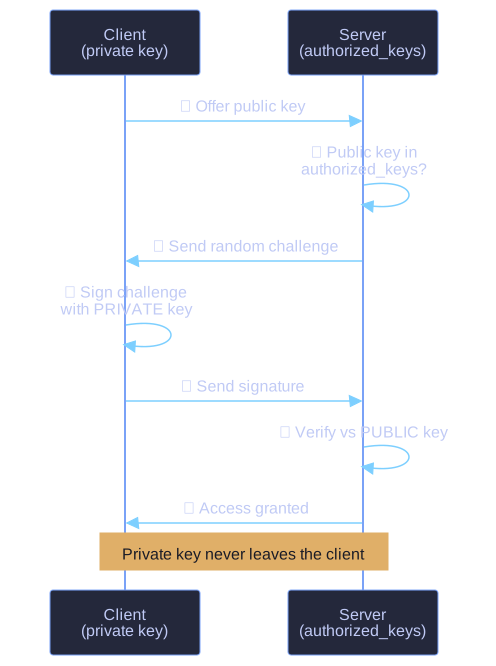
* Key-based SSH login — the server challenges, the client signs with its private key, and the server verifies against the stored public key; the private key never crosses the wire. *
The magic is asymmetric cryptography. The two keys are mathematically linked: anything the public key can verify, only the matching private key could have produced. At login the server sends a challenge, your client signs it with the private key, and the server checks the signature against the public key. Your secret never leaves your machine and is never sent over the network — which is the core reason keys beat passwords.
| Key | Lives on | Share it? |
|---|---|---|
| Private key | Your computer (~/.ssh/id_ed25519) |
Never — guard it like a password |
| Public key | The server (~/.ssh/authorized_keys) |
Yes, it's safe to hand out |
Why this is the production default:
- Can't be brute-forced — there's no password to guess.
- Scriptable — automated jobs can log in with no human typing a password.
- Per-key revocation — each device/person gets its own key, so you can cut off one without resetting everyone.
ssh-keygen -t ed25519      # generate a modern key pair (ed25519 preferred over old RSA)
ssh-copy-id user@server    # append your public key to the server's authorized_keys
Tip: Put a passphrase on the private key. Then even if the file is stolen, it's useless without the passphrase — and an ssh-agent can hold it unlocked so you only type it once per session.
Go deeper:
 ssh-keygen(1) — Linux manual page — generating key pairs with
 -t ed25519and the public/private key model.