What is the difference between df and du?
df reports free/used space per mounted filesystem (the whole disk view); du adds up the actual size of files in a directory tree (the folder view).
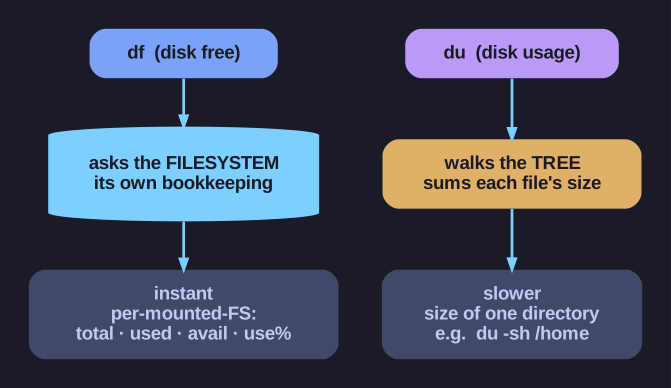
* df asks the filesystem how full it is; du walks the directory tree adding up file sizes. *
They answer two different questions:
df(disk free) asks the filesystem how full it is. It reads the filesystem's own bookkeeping, so it's instant and shows every mounted filesystem with total, used, available, and use%.du(disk usage) asks "how big is this directory?" by walking the tree and summing file sizes. It's slower because it actually traverses the files.
df -h                 # all filesystems, human-readable (GiB)
df -h /dev/sda1       # just this one
du -sh /home          # one summary line for /home (-s = summary)
du -h /var/log        # size of each subdirectory under /var/log
The -h vs -H distinction trips people up:
-h= binary units (1024-based): KiB, MiB, GiB-H= SI/decimal units (1000-based): KB, MB, GB
Why a "1 TB" disk shows ~931 GiB: the manufacturer advertises 1 TB = 1,000,000,000,000 bytes (SI), but the OS counts in binary (GiB = 1024³). Divide and you get ~931 GiB — no space went missing, it's just two different definitions of "giga".
Classic gotcha: df can show a filesystem 100% full while du finds far less data. The usual cause is a deleted-but-still-open file — a process holds it open, so the space isn't freed until the process closes it (or you restart it).
Go deeper:
 df (Unix) — Wikipedia —
 dfreports free/used space from the filesystem's own accounting.- du (Unix) — Wikipedia —
dusums actual file sizes by walking the tree.