What is the difference between single quotes, double quotes, and backslash in Bash?
Single quotes are fully literal (nothing expands), double quotes still expand $var` and `$(...), and a backslash escapes just the next single character.
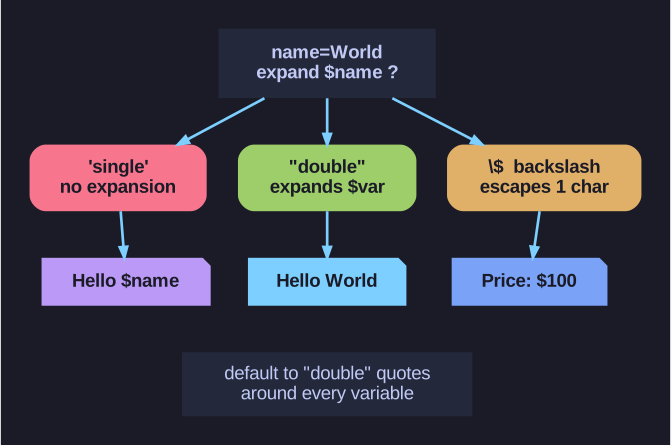
* Does bash expand $? Single = no, double = yes, backslash = escapes one character. *
The whole question is: do you want bash to interpret $, backticks, and globs, or treat them as plain text?
'single'— bash touches nothing.$name` stays the literal text `$name. Use it when you mean exactly the characters typed."double"— bash still expands variables ($name`), command substitution (`$(...)), and backticks, but protects spaces and most globbing. This is the everyday choice because you usually want$varto expand while keeping the value safe from word-splitting.\— escapes one following character, e.g.\$to get a literal dollar sign inside double quotes.
name="World"
echo 'Hello $name'    # Hello $name   (single: literal)
echo "Hello $name"    # Hello World   (double: expanded)
echo "Price: \$100"   # Price: $100   (backslash escapes the $)
The classic gotcha — quote your variables. "$var"` keeps a value with spaces as one argument; bare `$var gets split into multiple words (and empty values vanish entirely). rm $file` on a file named `my report.txt` tries to delete *two* files; `rm "$file" does the right thing.
Special characters bash treats specially (so they may need quoting/escaping): $ \ \ " ! * ? [ ] { } ~ # &`
Tip: Default to double quotes around every variable expansion — it prevents the single most common scripting bug.
Go deeper:
 Bash Guide: Quotes (Wooledge) — single vs double quotes, backslash, and why word-splitting makes quoting essential.
 ShellCheck SC2086: double-quote to prevent splitting — the classic unquoted-variable bug.