What is the difference between STDOUT and STDERR in shell scripts?
STDOUT (FD 1) carries normal output; STDERR (FD 2) carries errors and diagnostics — both default to the screen but are separate streams you can redirect independently.
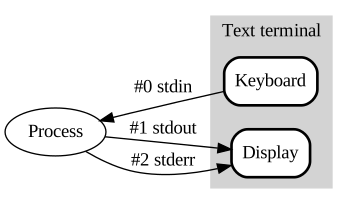
* The three standard streams — stdin (0) reads from the keyboard; stdout (1) and stderr (2) both write to the display but are separate channels. — Danielpr85, Public domain, via Wikimedia Commons. *
Splitting them is what makes scripts composable. Normal results flow on STDOUT so they can be piped to the next command, while errors go to STDERR so they still reach the user even when STDOUT is captured into a file. In your own scripts you write to STDERR explicitly with >&2, so error messages don't pollute the data your script produces:
echo "result: 42"            # normal output → STDOUT
echo "warning: low disk" >&2 # error message → STDERR
| Stream | FD | Purpose | Default |
|---|---|---|---|
| STDOUT | 1 | Normal output | Screen |
| STDERR | 2 | Error messages | Screen |
In scripts:
echo "This goes to STDOUT"
echo "This goes to STDERR" >&2
Redirecting:
./script.sh > output.log      # STDOUT to file
./script.sh 2> errors.log     # STDERR to file
./script.sh > all.log 2>&1    # Both to same file
./script.sh &> all.log        # Both (shorthand)
Why separate them?
- Can log errors separately from normal output
- Can suppress errors:
command 2>/dev/null - Scripts can check for errors by reading STDERR
Go deeper:
 Standard streams — Wikipedia — why FD 1 and FD 2 are separate and how each defaults to the terminal.
- Bash Reference: Redirections —
>,2>and2>&1to split or merge the streams.