What is the difference between TTY and PTY?
A TTY is a "real" console backed by actual hardware (or the machine's own video console); a PTY is a software-faked terminal used by GUI terminal windows and SSH.
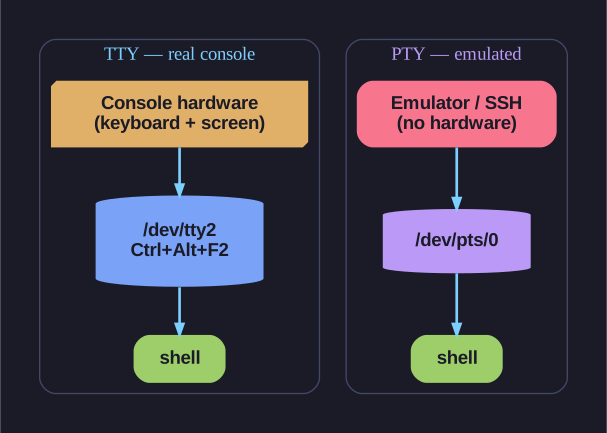
* Same shell, different backing — a TTY sits on real console hardware, a PTY is a program pretending to be a terminal. *
Both are kernel devices that behave like a terminal — they handle line editing, Ctrl+C, and so on. The difference is what's on the other end. A TTY connects to physical-ish hardware (the keyboard+screen attached to the box, or one of Linux's built-in virtual consoles). A PTY has no hardware behind it at all: one program pretends to be the "terminal" so another program (your shell) thinks it's talking to one.
| Type | Backed by | Example |
|---|---|---|
| TTY | The machine's own console hardware | Ctrl+Alt+F2 → /dev/tty2 |
| PTY | A program emulating a terminal | GNOME Terminal, xterm, an SSH session |
The name TTY comes from TeleTYpe, the electromechanical typewriters that were the first computer terminals — the abbreviation outlived the hardware by 50 years.
This is why your devices are named the way they are:
/dev/tty1–tty6: the built-in virtual consoles you reach with Ctrl+Alt+F1–F6./dev/pts/0,pts/1…: pseudo-terminal slaves — one per GUI terminal window or SSH login (pts= "pseudo-terminal slave").
tty # prints which terminal you're on, e.g. /dev/pts/0 or /dev/tty2
Tip: A headless server has no GUI and no graphics card in use, so you'll only ever land on a TTY or a PTY over SSH — never a GNOME Terminal.
Go deeper:
 pty(7) — Linux manual page — a pseudoterminal is a master/slave virtual device pair, used by SSH and terminal emulators.
- pts(4) — Linux manual page — documents
/dev/ptmxand the/dev/ptsslave devices the card names.