What is the most commonly overlooked static routing problem, and how does extended ping help diagnose it?
The most common problem is a missing return route — traffic reaches the destination but replies can't get back. Standard ping from the router won't catch this because it uses the router's exit interface IP (Internet Protocol). Extended ping from the LAN (Local Area Network) source IP reveals it.
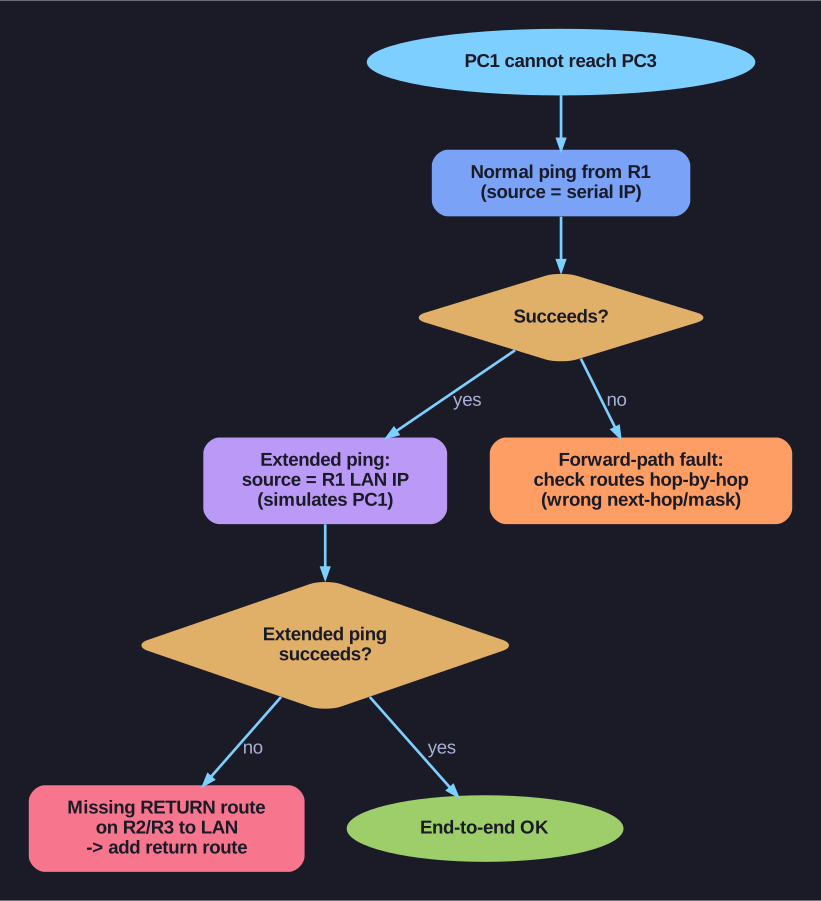
* Extended ping exposes a missing return route. *
The hidden problem:
R1# ping 192.168.2.1          ← SUCCESS (source = R1's serial IP, which R3 knows)
PC1> ping 192.168.2.1          ← FAIL (source = 172.16.3.10, which R3 has no route to)
Why standard ping misleads you:
ping 192.168.2.1from R1 uses R1's outgoing interface IP as the source- R3 has a connected route back to R1's serial interface → reply works
- But PC1's source IP (172.16.3.10) is on R1's LAN → R3 needs an explicit route back to 172.16.3.0/24
- If R3 (or R2) lacks this return route → PC1's ping fails even though R1's ping succeeds
Extended ping to the rescue:
R1# ping
Protocol [ip]:
Target IP address: 192.168.2.1
Source address or interface: 172.16.3.1    ← Use LAN interface as source!
This simulates PC1's traffic by sourcing from R1's LAN IP. If this extended ping fails but the normal ping succeeds → the problem is a missing return route on R2 or R3.
The fix: Add the return route on every intermediate and destination router:
R3(config)# ip route 172.16.3.0 255.255.255.0 192.168.1.1
R2(config)# ip route 172.16.3.0 255.255.255.0 172.16.2.1
Tip: When troubleshooting connectivity between two PCs across routers, ALWAYS use extended ping from the source LAN interface. Standard router ping tests router-to-router connectivity, not end-to-end.
Go deeper:
 Routing (Wikipedia) — forward and return paths are independent, the asymmetry that makes a missing return route invisible to a normal ping.