What is the SNMP and RADIUS topology for WPA2 Enterprise, and how do you configure the RADIUS server on the WLC?
In a WPA2 (Wi-Fi Protected Access 2) Enterprise deployment, the WLC (Wireless LAN Controller) forwards authentication requests to a RADIUS (Remote Authentication Dial-In User Service) server. Configure the RADIUS server on the WLC by navigating to Security → RADIUS → Authentication → New, then enter the server IP (Internet Protocol) and shared secret.
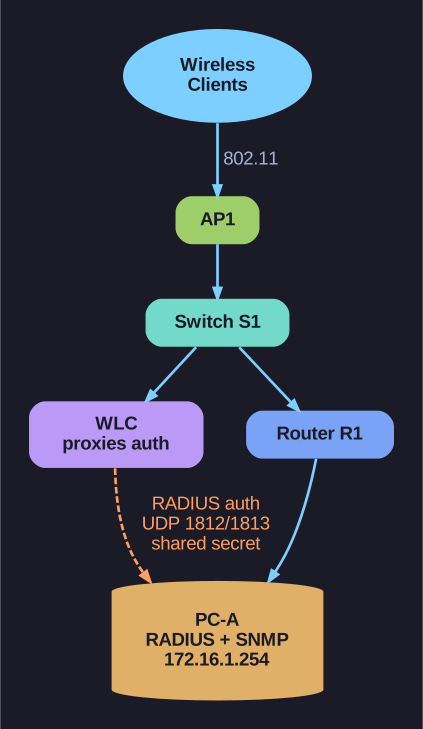
* WPA2-Enterprise: WLC proxies auth to RADIUS. *
Enterprise WLAN (Wireless Local Area Network) topology:
[Wireless Clients] ~~~ [AP1] --- [Switch S1] --- [Router R1] --- [PC-A (RADIUS/SNMP)]
                                      |
                                     [WLC]
- PC-A runs both SNMP server (for WLC monitoring/logging) and RADIUS server (for user authentication)
- WLC forwards authentication requests to the RADIUS server
- Users enter credentials → WLC proxies to RADIUS → RADIUS validates → WLC grants/denies access
Configuring RADIUS on the WLC:
- Navigate to Security → RADIUS → Authentication
- Click New to add a RADIUS server
- Enter:
- Server IP Address: IP of the RADIUS server (e.g., 172.16.1.254)
- Shared Secret: The password shared between WLC and RADIUS server (must match on both sides)
- Port: Default 1812 (authentication), 1813 (accounting)
- Click Apply
Important: The RADIUS shared secret is NOT the user's password — it's the encryption key for communication between the WLC and the RADIUS server. It must be identical on both devices.
Go deeper:
 RADIUS (Wikipedia) — the AAA the WLC proxies to: Access-Request on UDP 1812, accounting on 1813, shared secret.
- IEEE 802.1X (Wikipedia) — the supplicant→authenticator(WLC)→authentication-server flow this topology implements.