Quiz Entry - updated: 2026.07.30
What is traceroute and how does it work?
Traceroute maps the hops to a destination by sending packets with TTL=1, then 2, then 3, etc. Each router that drops a packet at TTL 0 returns an ICMP Time Exceeded, revealing its address and round-trip time until the destination is reached.
Traceroute (tracert on Windows):
A utility that traces the path packets take from source to destination and identifies each hop along the way.
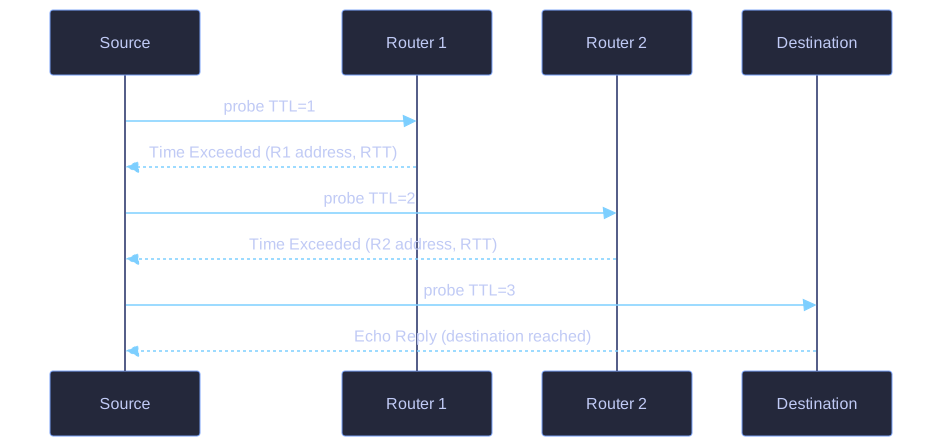
* By raising the TTL one at a time, each successive router answers with Time Exceeded — revealing the whole path until the destination finally replies. *
Commands:
traceroute 192.168.10.2    (Linux/Cisco)
tracert 192.168.10.2       (Windows)
How Traceroute Works:
Uses ICMP Time Exceeded messages:
- Send packet with TTL = 1
- First router decrements TTL to 0, sends Time Exceeded
- Send packet with TTL = 2
- Second router decrements TTL to 0, sends Time Exceeded
- Continue incrementing TTL until destination reached (or a predefined maximum)
TTL=1 → Router 1 responds (Time Exceeded)
TTL=2 → Router 2 responds (Time Exceeded)
TTL=3 → Router 3 responds (Time Exceeded)
TTL=4 → Destination responds (Echo Reply)
Output Information:
- IP address of each hop
- Round-trip time (RTT) for each hop
- Asterisk (*) indicates lost or unreplied packet (or a router configured not to reply)
Use cases:
- Identify where packets are being dropped
- Locate problematic routers in the path
- Measure latency at each hop
Go deeper:
 How traceroute works — step-by-step animation of the TTL-increment trick.
 Traceroute — Wikipedia — TTL handling, UDP vs ICMP probes, and reading hop output.