What is transaction signing, and why is it stronger than just OTP login?
The user cryptographically signs the specific transaction details (amount, recipient), not just "I'm here". This binds the response to that transaction — malware can't redirect the payment without breaking the signature.
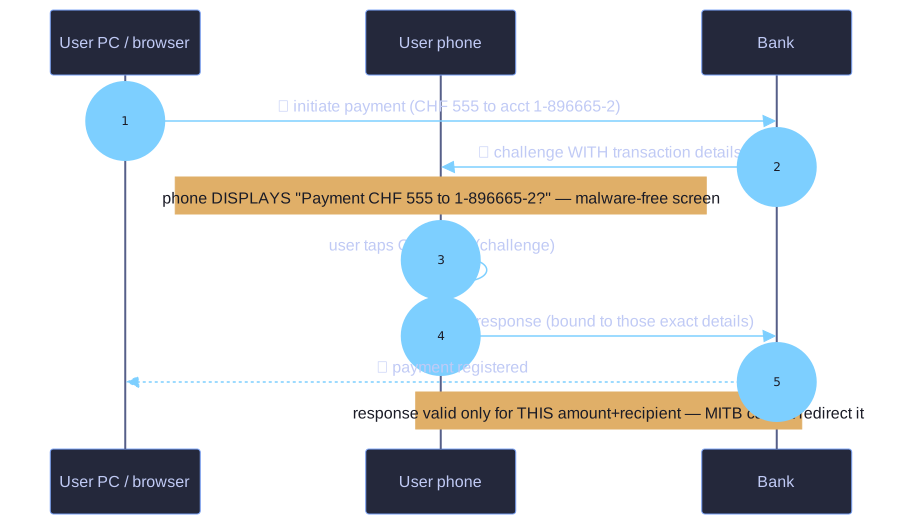
* The phone shows the real amount and recipient on a malware-free screen; the signature binds to them. *
The key insight: TOTP and mTAN sign "I'm logged in now". Transaction signing signs "I authorise transferring CHF 555 to account 1-896665-2 specifically ".
Why the difference matters with man-in-the-browser malware:
- TOTP login → malware sees you log in → silently injects a "transfer CHF 50 000 to mule account" once you're authenticated. Server has no way to tell the difference.
- Transaction signing → the token's display shows the actual amount + recipient. The user reads it on the token (which malware can't touch) and approves. The signed response is bound to those exact details.
Token variants for transaction signing (same hardware as 2FA, different usage):
- mTAN with details: SMS contains "Payment CHF 555 to 1-896665-2, code XK83L4". User reads the amount and recipient in the SMS before typing the code.
- C/R manual (chipTAN): user types the transaction details into the device; device shows a TAN that's a function of those details.
- C/R semi-automatic (PhotoTAN): screen shows a QR-like image encoding amount+recipient; phone decodes, displays human-readable details, asks for confirmation, computes response.
- C/R fully automatic (Mobile ID): bank pushes "Payment CHF 555 to 1-896665-2?" to the phone; user taps OK; phone returns signature over a data channel.
The critical UX rule: if the token doesn't display the transaction details, you have a key-protected login, not real transaction signing.
Go deeper:
 Transaction authentication number — chipTAN/photoTAN (Wikipedia) — the "what-you-see-is-what-you-sign" token designs.