What is umask and how does it affect new file permissions?
umask is a bitmask of permissions to STRIP OFF every newly created file or directory; with the common 022, a new file starts at 666 - 022 = 644 and a new directory at 777 - 022 = 755.
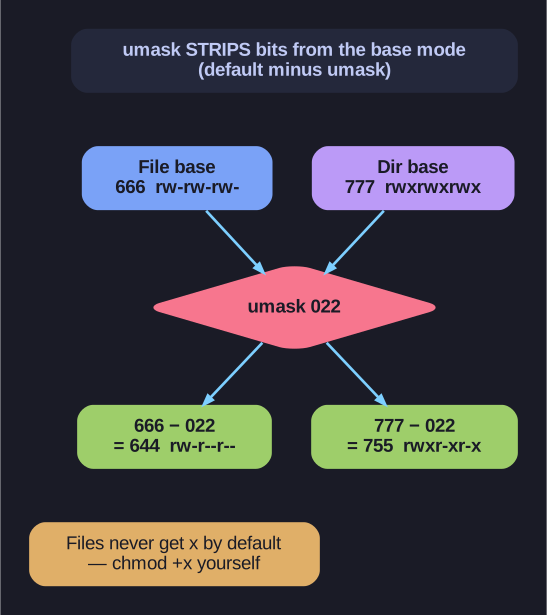
* umask math — base (666 file / 777 dir) minus the mask. *
The mental model is "default minus umask", and for the everyday values that subtraction gives the right answer. Strictly the kernel does a bitwise clear (mode AND NOT umask), not arithmetic — the difference only shows up in odd cases, but it's why a 1-bit in the umask always removes the matching permission and can never add one. Two things to remember: the base is 666 for files (never 777 — the system refuses to auto-grant execute, you must chmod +x yourself) and 777 for directories; and umask only limits initial permissions, it doesn't touch existing files.
Default permissions:
- Files: 0666 (rw-rw-rw-)
- Directories: 0777 (rwxrwxrwx)
Formula:
Final = Default with the umask bits cleared (≈ Default - umask)
Common umask values:
| umask | New File | New Directory |
|---|---|---|
| 0022 | 0644 (rw-r--r--) | 0755 (rwxr-xr-x) |
| 0002 | 0664 (rw-rw-r--) | 0775 (rwxrwxr-x) |
| 0077 | 0600 (rw-------) | 0700 (rwx------) |
Examples:
# With umask 0022:
# File:      0666 - 0022 = 0644 (rw-r--r--)
# Directory: 0777 - 0022 = 0755 (rwxr-xr-x)

# With umask 0077:
# File:      0666 - 0077 = 0600 (rw-------)
# Directory: 0777 - 0077 = 0700 (rwx------)
View/set umask:
# Display current umask
umask
# Set umask for this session
umask 0022
Note: umask is set in shell profile files (~/.bashrc, /etc/profile). Execute permissions are never set by default for files - you must explicitly chmod +x.
Go deeper:
 umask(2) — file mode creation mask — umask is a bitwise clear (not subtraction) applied at creation.