Quiz Entry - updated: 2026.07.30
What parameters must match between a wireless client and an AP for successful association, and what is the association process?
Five parameters must match: SSID, password, network mode (802.11 standard), security mode (WPA2/WPA3), and channel settings. The association process is: Discover → Authenticate → Associate.
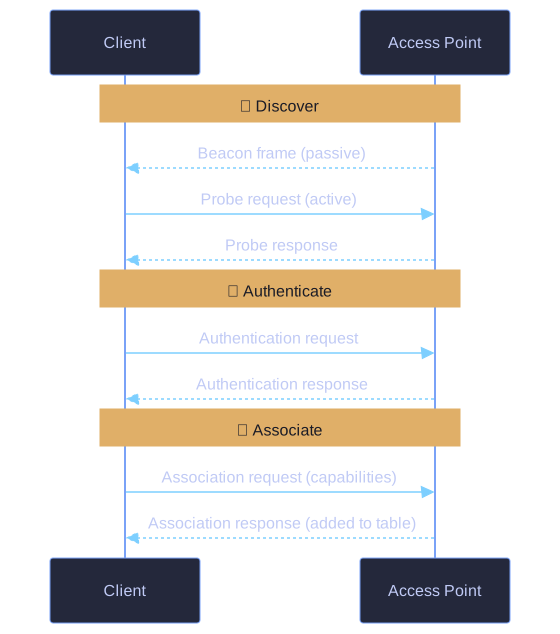
* 802.11 association: Discover, Authenticate, Associate. *
Required matching parameters:
| Parameter | What It Is | Example |
|---|---|---|
| SSID | Network name | "CorporateWiFi" |
| Password | Pre-shared key or 802.1X credentials | "MyP@ssw0rd!" |
| Network mode | 802.11 standard | 802.11ac (Wi-Fi 5) |
| Security mode | Encryption/authentication type | WPA2-Personal, WPA3-Enterprise |
| Channel settings | Frequency band | 2.4 GHz channel 6, or 5 GHz channel 36 |
Three-step association process:
- Discover: Client finds available APs
- Passive mode: Client listens for beacon frames broadcast by APs (AP advertises itself)
- Active mode: Client broadcasts probe request frames (client asks "who's out there?")
- Authenticate: Client provides credentials to the AP
- Associate: Client and AP exchange capability information, AP adds client to association table
Passive vs Active discovery:
- Passive: Client just listens — lower power consumption, slower discovery
- Active: Client actively probes — faster discovery, slightly higher power usage
- Most clients use active mode by default
Go deeper:
 IEEE 802.11 (Wikipedia) — the management frames behind Discover/Authenticate/Associate (beacons, probes, auth, association).