What technologies make up the complete web application stack?
A full web app splits into three pieces: the client (frontend) that runs in the browser, the server (backend) that runs on a machine you control, and the communication layer that carries data between them.
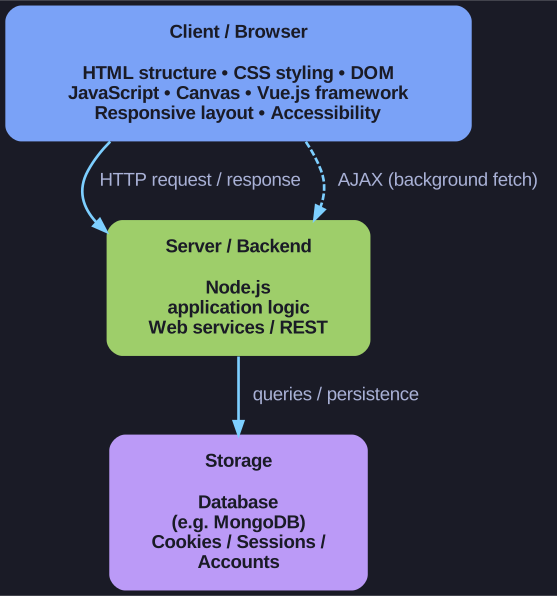
* A full web application is three tiers over the wire: the browser sends HTTP and AJAX requests to the backend, which reads and writes the database. *
The mental model to hold onto is two computers talking over a wire. The client is code running in the user's browser; the server is code running on your hosting machine, usually next to a database. Neither can do the other's job: the browser can't touch your database directly, and the server can't draw pixels on the user's screen. Everything they share must travel across the communication layer — which is why that middle piece is its own concern, not an afterthought.
Client / Frontend — everything the browser renders and runs:
- HTML for structure, CSS for styling, and DOM manipulation to change the page live
- JavaScript for behaviour, and Canvas for drawing graphics
- Responsive layouts so one page adapts from phone to desktop
- Web frameworks (e.g. Vue.js) to organise larger UIs
- Accessibility, so the app works with screen readers and keyboards
Server / Backend — everything that runs on your machine, out of the user's reach:
- Server-side JavaScript (Node.js) executing your application logic
- A database (e.g. MongoDB) for persistent storage
- Sessions and user accounts to remember who is logged in across requests
- Calls out to external web services, typically over REST
Communication — the wire between the two:
- HTTP, the request/response protocol every page load uses
- AJAX, which lets JavaScript fetch data in the background without reloading the whole page — the trick behind modern, app-like interfaces
Memory tip: browser ↔ wire ↔ server. Any web feature you meet slots into exactly one of these three boxes.
Go deeper:
 Web application (Wikipedia) — the three-tier presentation/application/storage model that maps onto client ↔ wire ↔ server.
- Ajax (Wikipedia) — the background-fetch technique that powers the communication layer without full page reloads.
 Introducing asynchronous JavaScript (MDN) — why fetching data in the background keeps the UI responsive.