When one wireless router can't cover a whole building, how do you extend Wi-Fi range with a wireless mesh network?
Add more access points that share the same SSID (Service Set Identifier) and security but sit on different, non-overlapping channels — together they form a wireless mesh network (WMN) that blankets a larger area. A single router typically reaches only ~45 m indoors / ~90 m outdoors.
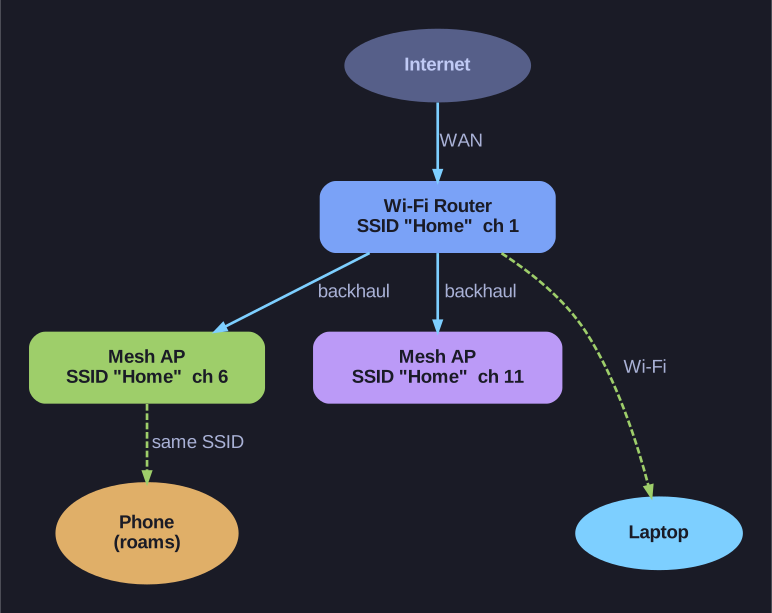
* Same SSID, different channels: the APs act as one roaming network. *
A lone small-office/home router covers a limited radius, so a large house or office has dead zones. The fix is more radios working as one network:
- Same SSID + same security on every AP — a client roams seamlessly from one to the next without re-typing a password or picking a new network.
- Different channels on neighbouring APs — if two overlapping APs used the same channel they'd interfere and cancel out the benefit (this is why the non-overlapping 1/6/11 rule matters here too).
- Overlap the coverage — cells should touch so there's no gap where a roaming client drops.
Consumer "mesh" kits automate all of this: manufacturers make creating a WMN plug-and-play through a smartphone app, so you no longer configure each node by hand.
Go deeper:
 Wireless mesh network (Wikipedia) — how radio nodes in a mesh topology forward traffic to form one "mesh cloud" of coverage.