When you keep interacting with a cookie-authenticated site, why does the cookie's expiry time keep moving further into the future?
It's a sliding (rolling) expiration — each request refreshes the session's last-access time so active users aren't logged out mid-use, while idle sessions still time out.
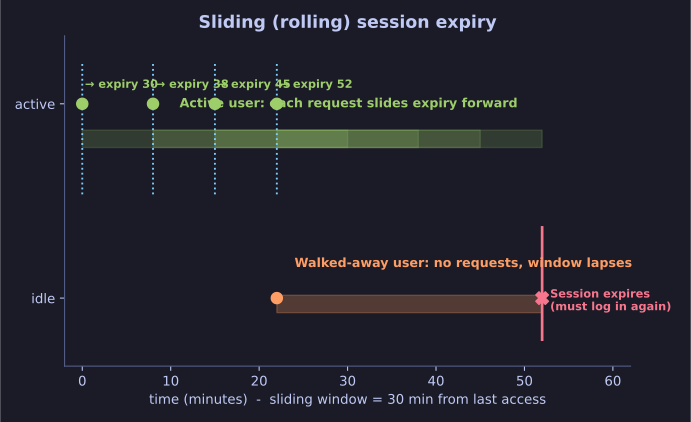
* Sliding expiry: each request renews the window; idle sessions still time out. *
The server tracks a __lastAccess timestamp for the session. On every request it pushes the expiry forward (e.g. "valid for 30 more minutes from now"). The effect:
- Active user: the window keeps renewing, so they stay logged in seamlessly.
- Walked-away user: no requests ⇒ the window lapses ⇒ the session expires and they must log in again.
This balances security (abandoned sessions die) against usability (you're not kicked out while working).
Tip: __lastAccess is typically a Unix timestamp — seconds since 1 Jan 1970 UTC. Watch the time zone: a cookie's "valid until" shown in UTC can look an hour or two off from your local clock.
Go deeper:
 OWASP Session Management Cheat Sheet — the idle-vs-absolute-timeout distinction behind sliding (rolling) expiry.