Why should you keep router/AP firmware updated, and how does a WLC simplify this across many APs?
Firmware updates fix reported bugs and — critically — patch security vulnerabilities, so check for them periodically. A WLC can upgrade the firmware on all the APs (Access Points) it controls at once, instead of updating each AP by hand.
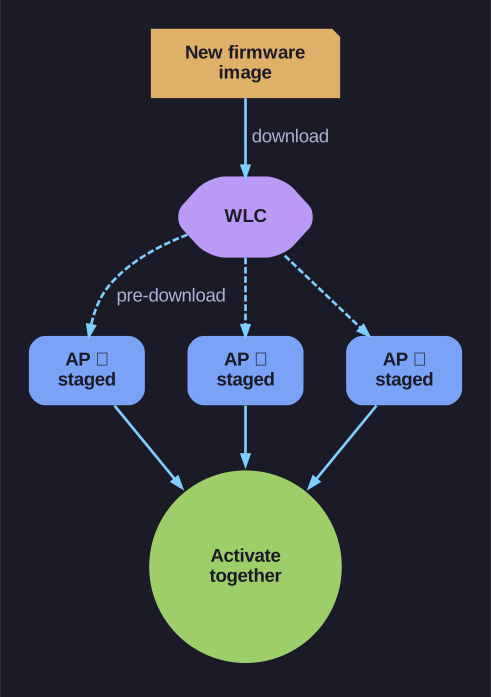
* The WLC stages one image on every AP, then activates them together. *
Firmware is the device's built-in software, and new releases carry fixes for problems customers reported and security patches — so an AP left on old firmware is a known, unpatched hole an attacker can target. That makes periodic firmware checks a real security control, not just housekeeping.
- Standalone router/AP — you update it directly through its GUI; manageable for one device, tedious across many.
- WLC-managed APs — the controller centralises it: it can push a new image to every AP it manages. Cisco WLCs use an AP image pre-download — the new image is staged onto all APs first, then activated together, which minimises the downtime of the upgrade.
Tip: treat firmware updates like any patch cycle — schedule them, and read the release notes for security fixes so you know what a delay leaves exposed.
Go deeper:
 Firmware (Wikipedia) — what firmware is, the flashing/update process, and the security risks of leaving it unpatched.