Question
How does a VLAN hopping attack via switch spoofing work, and how do you prevent it?
Answer
The attacker configures their NIC (Network Interface Card) to act as a switch and sends DTP (Dynamic Trunking Protocol) frames to negotiate a trunk link. If the port is in dynamic auto or dynamic desirable mode, a trunk forms and the attacker gains access to all VLANs (Virtual Local Area Networks).
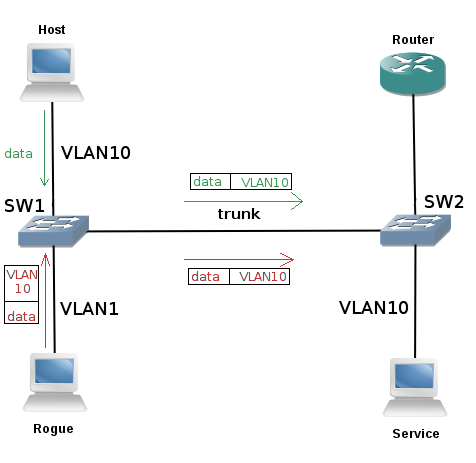
* VLAN hopping across a trunk via the native VLAN. — Braonle, CC BY-SA 4.0, via Wikimedia Commons. *
The attack:
- Attacker's device sends DTP frames to the switch port
- If the port is set to
dynamic autoordynamic desirable(default on many switches), it negotiates a trunk - Once the trunk is established, the attacker can send and receive 802.1Q-tagged frames for any VLAN
- The attacker now has access to every VLAN on the switch — effectively bypassing all VLAN segmentation
Why it works: By default, many Cisco switch ports are set to dynamic auto — they'll become a trunk if the other side requests it. The attacker simply requests trunking.
Prevention:
! On ALL access ports:
Switch(config-if)# switchport mode access        ! Force access mode — never trunk
Switch(config-if)# switchport nonegotiate         ! Disable DTP entirely

! On trunk ports:
Switch(config-if)# switchport mode trunk           ! Manually set to trunk
Switch(config-if)# switchport nonegotiate          ! Disable DTP negotiation

! Disable unused ports:
Switch(config-if)# shutdown
Switch(config-if)# switchport access vlan 999      ! Assign to unused "black hole" VLAN
Tip: The single most important step: never leave ports in dynamic mode. Every port should be explicitly set to either access or trunk.
Go deeper:
 VLAN hopping (Wikipedia) — covers switch-spoofing via DTP trunk negotiation and the disable-DTP / access-only-port countermeasure.
Note saved — thanks!
Question
What are the four main Layer 2 mitigation techniques, and which attacks does each prevent?
Answer
The four main solutions are: Port Security (MAC (Media Access Control) flooding), DHCP (Dynamic Host Configuration Protocol) Snooping (DHCP attacks), Dynamic ARP (Address Resolution Protocol) Inspection (ARP attacks), and IP (Internet Protocol) Source Guard (address spoofing). They won't work if management protocols aren't also secured.
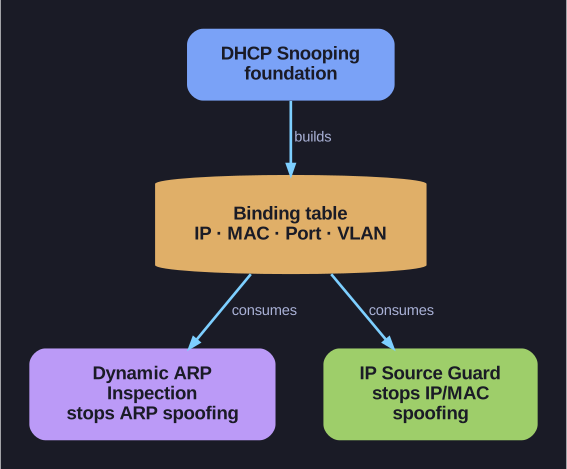
* DHCP snooping's binding table underpins DAI (Dynamic ARP Inspection) and IPSG (IP Source Guard). *
| Solution | Prevents | How It Works |
|---|---|---|
| Port Security | MAC address flooding, DHCP starvation | Limits the number of MAC addresses allowed on a port |
| DHCP Snooping | DHCP starvation, DHCP spoofing | Classifies ports as trusted/untrusted; blocks rogue DHCP server messages on untrusted ports |
| Dynamic ARP Inspection (DAI) | ARP spoofing, ARP poisoning | Validates ARP packets against DHCP snooping binding table |
| IP Source Guard (IPSG) | IP spoofing, MAC spoofing | Filters traffic based on DHCP snooping binding table — only allows traffic from legitimately assigned IPs |
Critical additional requirements: These Layer 2 solutions are useless if the management protocols aren't secured:
- Use SSH (Secure Shell) (not Telnet) for device management
- Use SCP (Secure Copy Protocol)/SFTP (Secure File Transfer Protocol) (not FTP (File Transfer Protocol)) for file transfers
- Use SSL (Secure Sockets Layer)/TLS (Transport Layer Security) for web-based management
- Consider out-of-band management (separate management network)
- Use a dedicated management VLAN (Virtual Local Area Network) with ACLs (Access Control Lists)
- Filter unwanted access with ACLs
Tip: These four mechanisms form a defense-in-depth stack — DHCP Snooping is the foundation (builds the binding table), DAI and IPSG consume that table, and Port Security provides the MAC-level enforcement.
Go deeper:
- MAC filtering — Port security (Wikipedia) — the per-port MAC-limit mechanism behind Port Security.
Note saved — thanks!